Preview links stay in the example. Copy the source to use your own destinations. Form previews never send information.
Copy the source HTML CSS JavaScript Astro
Copy HTML <section
class="fct-indexworks-project-gallery"
data-snippet="indexworks-project-gallery"
aria-labelledby="fct-indexworks-project-gallery-title"
>
<div class="c-inner">
<header class="c-gallery-heading">
<div>
<p class="c-kicker">INDEXWORKS / A VISUAL PROJECT INDEX</p>
<h2 id="fct-indexworks-project-gallery-title">Spaces & structures.</h2>
</div>
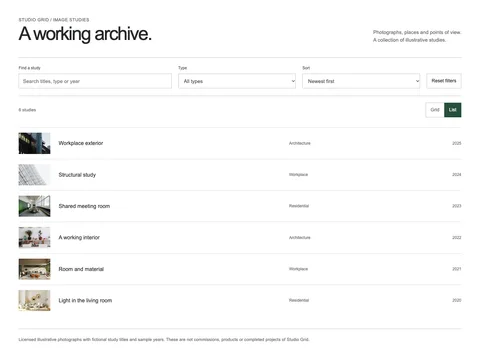
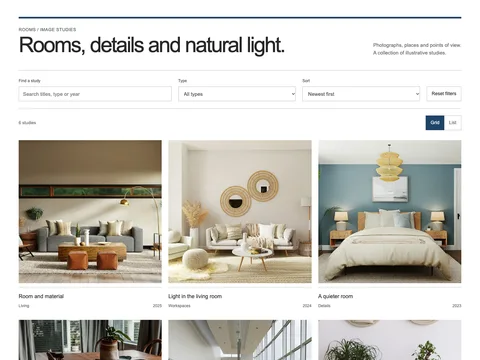
<p>A collection of illustrative studies.<br />Browse by type, title or year.</p>
</header>
<form class="c-gallery-controls">
<fieldset disabled>
<legend class="c-visually-hidden">Filter and sort project studies</legend>
<label
>Find a study<input
name="search"
type="search"
placeholder="Try workplace"
maxlength="100" /></label
><label
>Type<select name="type">
<option value="all">All types</option>
<option value="architecture">Architecture</option>
<option value="residential">Residential</option>
<option value="workplace">Workplace</option>
</select></label
><label
>Sort<select name="sort">
<option value="newest">Newest first</option>
<option value="oldest">Oldest first</option>
<option value="title">Title A–Z</option>
</select></label
><button type="reset">Reset filters</button>
</fieldset>
</form>
<div class="c-gallery-toolbar">
<p role="status" data-gallery-status>6 studies</p>
<div role="group" aria-label="Gallery view">
<button type="button" data-view="grid" aria-pressed="true" disabled>Grid</button
><button type="button" data-view="list" aria-pressed="false" disabled>List</button>
</div>
</div>
<ul class="c-projects" data-current-view="grid">
<li
data-project
data-type="workplace"
data-title="Workplace exterior"
data-year="2025"
data-image="0"
>
<a class="c-project-image" href="images/building.webp" data-gallery-index="0"
><img
src="images/building.webp"
width="1120"
height="747"
alt="Glass and brick facade of an office building"
loading="eager"
/></a>
<div class="c-project-caption">
<h3><a href="images/building.webp" data-gallery-index="0">Workplace exterior</a></h3>
<p><span>Workplace</span><span>2025</span></p>
</div>
</li>
<li
data-project
data-type="residential"
data-title="Room study"
data-year="2024"
data-image="1"
>
<a class="c-project-image" href="images/room.webp" data-gallery-index="1"
><img
src="images/room.webp"
width="1120"
height="747"
alt="Living room with pale seating and timber furniture"
loading="eager"
/></a>
<div class="c-project-caption">
<h3><a href="images/room.webp" data-gallery-index="1">Room study</a></h3>
<p><span>Residential</span><span>2024</span></p>
</div>
</li>
<li
data-project
data-type="architecture"
data-title="Structural detail"
data-year="2023"
data-image="2"
>
<a class="c-project-image" href="images/structure.webp" data-gallery-index="2"
><img
src="images/structure.webp"
width="1120"
height="747"
alt="White steel frames against the sky"
loading="eager"
/></a>
<div class="c-project-caption">
<h3><a href="images/structure.webp" data-gallery-index="2">Structural detail</a></h3>
<p><span>Architecture</span><span>2023</span></p>
</div>
</li>
<li
data-project
data-type="workplace"
data-title="Shared meeting space"
data-year="2022"
data-image="3"
>
<a class="c-project-image" href="images/meeting.webp" data-gallery-index="3"
><img
src="images/meeting.webp"
width="1120"
height="747"
alt="Long meeting table with surrounding chairs"
loading="lazy"
/></a>
<div class="c-project-caption">
<h3><a href="images/meeting.webp" data-gallery-index="3">Shared meeting space</a></h3>
<p><span>Workplace</span><span>2022</span></p>
</div>
</li>
<li
data-project
data-type="residential"
data-title="Living room study"
data-year="2021"
data-image="4"
>
<a class="c-project-image" href="images/living.webp" data-gallery-index="4"
><img
src="images/living.webp"
width="1120"
height="747"
alt="Interior with a sofa, mirror and warm materials"
loading="lazy"
/></a>
<div class="c-project-caption">
<h3><a href="images/living.webp" data-gallery-index="4">Living room study</a></h3>
<p><span>Residential</span><span>2021</span></p>
</div>
</li>
<li
data-project
data-type="workplace"
data-title="Working together"
data-year="2020"
data-image="5"
>
<a class="c-project-image" href="images/office.webp" data-gallery-index="5"
><img
src="images/office.webp"
width="1120"
height="747"
alt="Bright office with shared desks"
loading="lazy"
/></a>
<div class="c-project-caption">
<h3><a href="images/office.webp" data-gallery-index="5">Working together</a></h3>
<p><span>Workplace</span><span>2020</span></p>
</div>
</li>
</ul>
<p class="c-gallery-empty" hidden>
No studies match. Try a different type or clear the search.
</p>
<dialog aria-label="Enlarged study image">
<button type="button" data-close>Close ×</button>
<figure>
<img width="1120" height="747" alt="" />
<figcaption></figcaption>
</figure>
<div class="c-viewer-controls">
<button type="button" data-prev>Previous</button
><span role="status" data-viewer-count></span><button type="button" data-next>Next</button>
</div>
</dialog>
<noscript
><p class="c-note">
Filters and view controls need JavaScript. All six studies are visible; image links open the
full-size photographs.
</p></noscript
>
<p class="c-note c-gallery-note">
Licensed illustrative photographs, fictional study titles and sample years. These are not
projects completed by Indexworks.
</p>
</div>
</section>
Copy CSS .fct-indexworks-project-gallery {
--ink: #252a27;
--muted: #5c655f;
--line: #c7ccc4;
--accent: #294c39;
background: #fff;
color: var(--ink);
font:
16px/1.55 Arial,
Helvetica,
sans-serif;
}
.fct-indexworks-project-gallery,
.fct-indexworks-project-gallery * {
box-sizing: border-box;
}
.fct-indexworks-project-gallery :is(h2, h3, h4, p, ul, figure, dl, dd) {
margin: 0;
}
.fct-indexworks-project-gallery :is(h2, h3, h4) {
font-weight: 400;
line-height: 1.1;
letter-spacing: -0.04em;
}
.fct-indexworks-project-gallery a {
color: inherit;
text-underline-offset: 4px;
}
.fct-indexworks-project-gallery :is(input, select, button) {
font: inherit;
color: inherit;
}
.fct-indexworks-project-gallery :is(a, button, input, select, summary):focus-visible {
outline: 3px solid #a33d12;
outline-offset: 4px;
}
.fct-indexworks-project-gallery .c-inner {
max-width: 1360px;
margin: auto;
padding: 50px clamp(20px, 4vw, 56px);
}
.fct-indexworks-project-gallery .c-kicker {
font-size: 0.8125rem;
letter-spacing: 0.04em;
text-transform: uppercase;
}
.fct-indexworks-project-gallery .c-note {
font-size: 0.8125rem;
color: var(--muted);
}
.fct-indexworks-project-gallery img {
display: block;
width: 100%;
height: auto;
}
.fct-indexworks-project-gallery [hidden] {
display: none !important;
}
.fct-indexworks-project-gallery .c-link {
display: flex;
align-items: center;
justify-content: space-between;
gap: 15px;
min-height: 44px;
text-decoration: none;
border-bottom: 1px solid currentColor;
padding-block: 10px;
}
.fct-indexworks-project-gallery button {
min-height: 44px;
cursor: pointer;
}
.fct-indexworks-project-gallery summary {
min-height: 44px;
align-content: center;
cursor: pointer;
}
.fct-indexworks-project-gallery .c-visually-hidden {
position: absolute;
width: 1px;
height: 1px;
overflow: hidden;
clip-path: inset(50%);
white-space: nowrap;
}
@media (max-width: 700px) {
.fct-indexworks-project-gallery .c-inner {
padding-block: 32px;
}
}
.fct-indexworks-project-gallery {
--ink: #272727;
--muted: #6b6b6b;
--line: #d7d7d7;
}
.fct-indexworks-project-gallery .c-inner {
max-width: 1480px;
}
.fct-indexworks-project-gallery .c-gallery-heading {
display: flex;
justify-content: space-between;
align-items: end;
gap: 40px;
margin-bottom: 40px;
}
.fct-indexworks-project-gallery h2 {
font-size: clamp(2.25rem, 4.5vw, 4rem);
letter-spacing: -0.055em;
}
.fct-indexworks-project-gallery .c-gallery-heading > p {
font-size: 0.9375rem;
color: var(--muted);
max-width: 35ch;
}
.fct-indexworks-project-gallery fieldset {
border: 0;
padding: 22px 0;
margin: 0;
min-width: 0;
display: grid;
grid-template-columns: 1.3fr 1fr 1fr auto;
gap: 20px;
align-items: end;
border-block: 1px solid #bcbcbc;
}
.fct-indexworks-project-gallery label {
display: grid;
gap: 8px;
font-size: 0.75rem;
color: #555;
}
.fct-indexworks-project-gallery :is(input, select) {
min-height: 44px;
border: 1px solid #bdbdbd;
background: white;
padding: 9px 12px;
border-radius: 0;
min-width: 0;
width: 100%;
font-size: 0.9375rem;
}
.fct-indexworks-project-gallery button {
border: 1px solid #bdbdbd;
background: #fff;
padding: 10px 14px;
border-radius: 0;
font-size: 0.875rem;
}
.fct-indexworks-project-gallery .c-gallery-toolbar {
display: flex;
align-items: center;
justify-content: space-between;
gap: 20px;
margin: 20px 0 30px;
font-size: 0.8125rem;
color: var(--muted);
}
.fct-indexworks-project-gallery [role="group"] {
display: flex;
gap: 0;
}
.fct-indexworks-project-gallery [data-view] + [data-view] {
border-left: 0;
}
.fct-indexworks-project-gallery [data-view][aria-pressed="true"] {
background: #2b2b2b;
color: white;
border-color: #2b2b2b;
}
.fct-indexworks-project-gallery .c-projects {
list-style: none;
padding: 0;
display: grid;
grid-template-columns: repeat(3, minmax(0, 1fr));
gap: 45px 28px;
align-items: start;
}
.fct-indexworks-project-gallery .c-project-image {
display: block;
min-width: 0;
}
.fct-indexworks-project-gallery .c-project-image img {
aspect-ratio: 4/3;
object-fit: cover;
}
.fct-indexworks-project-gallery .c-projects > li:nth-child(3n + 2) .c-project-image img {
aspect-ratio: 1/1;
}
.fct-indexworks-project-gallery .c-project-caption {
padding-top: 15px;
}
.fct-indexworks-project-gallery h3 {
font-size: 1rem;
letter-spacing: 0;
line-height: 1.35;
}
.fct-indexworks-project-gallery h3 a {
text-decoration: none;
display: inline-flex;
min-height: 32px;
align-items: center;
}
.fct-indexworks-project-gallery h3 a:hover {
text-decoration: underline;
}
.fct-indexworks-project-gallery .c-project-caption p {
display: flex;
justify-content: space-between;
gap: 20px;
font-size: 0.75rem;
color: #686868;
margin-top: 4px;
}
.fct-indexworks-project-gallery [data-current-view="list"] {
display: block;
}
.fct-indexworks-project-gallery [data-current-view="list"] > li {
display: grid;
grid-template-columns: 150px 1fr;
gap: 25px;
align-items: center;
padding: 18px 0;
border-top: 1px solid #d7d7d7;
}
.fct-indexworks-project-gallery [data-current-view="list"] .c-project-image img {
aspect-ratio: 1.5/1 !important;
}
.fct-indexworks-project-gallery [data-current-view="list"] .c-project-caption {
padding: 0;
display: grid;
grid-template-columns: 1fr 0.8fr;
gap: 20px;
align-items: center;
}
.fct-indexworks-project-gallery [data-current-view="list"] .c-project-caption p {
margin: 0;
gap: 20px;
}
.fct-indexworks-project-gallery .c-gallery-empty {
padding: 30px 0;
font-size: 0.9375rem;
color: var(--muted);
}
.fct-indexworks-project-gallery .c-gallery-note {
border-top: 1px solid #bcbcbc;
padding-top: 22px;
margin-top: 38px;
}
.fct-indexworks-project-gallery dialog {
max-width: min(1120px, calc(100vw - 24px));
max-height: calc(100dvh - 24px);
border: 0;
background: #fff;
color: #272727;
padding: 20px;
}
.fct-indexworks-project-gallery dialog::backdrop {
background: #111e;
}
.fct-indexworks-project-gallery dialog[open] {
display: flex;
flex-direction: column;
gap: 15px;
}
.fct-indexworks-project-gallery [data-close] {
align-self: end;
}
.fct-indexworks-project-gallery dialog img {
max-height: 65dvh;
object-fit: contain;
width: auto;
max-width: 100%;
margin: auto;
}
.fct-indexworks-project-gallery figcaption {
font-size: 0.875rem;
padding-top: 12px;
}
.fct-indexworks-project-gallery .c-viewer-controls {
display: flex;
align-items: center;
justify-content: space-between;
gap: 20px;
}
.fct-indexworks-project-gallery .c-viewer-controls > span {
font-size: 0.8125rem;
}
@media (max-width: 900px) {
.fct-indexworks-project-gallery fieldset {
grid-template-columns: 1fr 1fr;
gap: 16px;
}
.fct-indexworks-project-gallery fieldset button {
justify-self: start;
}
.fct-indexworks-project-gallery .c-projects {
grid-template-columns: repeat(2, minmax(0, 1fr));
}
.fct-indexworks-project-gallery .c-projects > li .c-project-image img {
aspect-ratio: 4/3 !important;
}
}
@media (max-width: 600px) {
.fct-indexworks-project-gallery .c-gallery-heading {
display: block;
margin-bottom: 28px;
}
.fct-indexworks-project-gallery .c-gallery-heading > p {
margin-top: 20px;
}
.fct-indexworks-project-gallery fieldset {
grid-template-columns: 1fr;
}
.fct-indexworks-project-gallery fieldset button {
justify-self: stretch;
}
.fct-indexworks-project-gallery .c-projects {
grid-template-columns: 1fr;
gap: 30px;
}
.fct-indexworks-project-gallery [data-current-view="list"] > li {
grid-template-columns: 85px 1fr;
gap: 15px;
}
.fct-indexworks-project-gallery [data-current-view="list"] .c-project-caption {
display: block;
}
.fct-indexworks-project-gallery [data-current-view="list"] .c-project-caption p {
margin-top: 7px;
font-size: 0.6875rem;
}
.fct-indexworks-project-gallery h3 {
font-size: 0.9375rem;
}
}
Copy JavaScript (() => {
for (const root of document.querySelectorAll('[data-snippet="indexworks-project-gallery"]')) {
if (root.dataset.initialized) continue;
root.dataset.initialized = "true";
const form = root.querySelector("form"),
list = root.querySelector(".c-projects"),
items = Array.from(list.children),
viewButtons = root.querySelectorAll("[data-view]"),
dialog = root.querySelector("dialog");
let visible = items.slice(),
current = 0,
last = null;
form.querySelector("fieldset").disabled = false;
for (const button of viewButtons) {
button.disabled = false;
button.addEventListener("click", () => {
list.dataset.currentView = button.dataset.view;
for (const b of viewButtons) b.setAttribute("aria-pressed", String(b === button));
});
}
const update = () => {
const q = form.elements.search.value.trim().toLocaleLowerCase(),
type = form.elements.type.value,
sort = form.elements.sort.value;
visible = items
.filter(
(item) =>
(type === "all" || item.dataset.type === type) &&
(!q ||
(item.dataset.title + " " + item.dataset.type + " " + item.dataset.year)
.toLocaleLowerCase()
.includes(q)),
)
.sort((a, b) =>
sort === "title"
? a.dataset.title.localeCompare(b.dataset.title)
: sort === "oldest"
? Number(a.dataset.year) - Number(b.dataset.year)
: Number(b.dataset.year) - Number(a.dataset.year),
);
for (const item of items) item.hidden = !visible.includes(item);
for (const item of visible) list.append(item);
root.querySelector("[data-gallery-status]").textContent =
visible.length + " " + (visible.length === 1 ? "study" : "studies");
root.querySelector(".c-gallery-empty").hidden = !!visible.length;
};
form.addEventListener("submit", (e) => e.preventDefault());
form.addEventListener("input", update);
form.addEventListener("change", update);
form.addEventListener("reset", (e) => {
e.preventDefault();
form.elements.search.value = "";
form.elements.type.value = "all";
form.elements.sort.value = "newest";
update();
});
const show = (i) => {
current = (i + visible.length) % visible.length;
const item = visible[current],
image = item.querySelector("img"),
target = dialog.querySelector("img");
target.src = image.src;
target.alt = image.alt;
dialog.querySelector("figcaption").textContent =
item.dataset.title + " · " + item.dataset.year;
root.querySelector("[data-viewer-count]").textContent = current + 1 + " / " + visible.length;
};
root.addEventListener("click", (e) => {
const anchor = e.target.closest("[data-gallery-index]");
if (anchor && !e.ctrlKey && !e.metaKey && typeof dialog.showModal === "function") {
e.preventDefault();
last = anchor;
const item = anchor.closest("[data-project]");
show(visible.indexOf(item));
dialog.showModal();
}
});
root.querySelector("[data-close]").addEventListener("click", () => dialog.close());
root.querySelector("[data-prev]").addEventListener("click", () => show(current - 1));
root.querySelector("[data-next]").addEventListener("click", () => show(current + 1));
dialog.addEventListener("keydown", (e) => {
if (["ArrowLeft", "ArrowRight"].includes(e.key)) {
e.preventDefault();
show(current + (e.key === "ArrowRight" ? 1 : -1));
}
});
dialog.addEventListener("close", () => last?.focus());
update();
}
})();
Copy Astro ---
// Original reusable section. Use unique IDs, selectors and radio names before duplicating.
---
<section
class="fct-indexworks-project-gallery"
data-snippet="indexworks-project-gallery"
aria-labelledby="fct-indexworks-project-gallery-title"
>
<div class="c-inner">
<header class="c-gallery-heading">
<div>
<p class="c-kicker">INDEXWORKS / A VISUAL PROJECT INDEX</p>
<h2 id="fct-indexworks-project-gallery-title">Spaces & structures.</h2>
</div>
<p>A collection of illustrative studies.<br />Browse by type, title or year.</p>
</header>
<form class="c-gallery-controls">
<fieldset disabled>
<legend class="c-visually-hidden">Filter and sort project studies</legend>
<label
>Find a study<input
name="search"
type="search"
placeholder="Try workplace"
maxlength="100" /></label
><label
>Type<select name="type">
<option value="all">All types</option>
<option value="architecture">Architecture</option>
<option value="residential">Residential</option>
<option value="workplace">Workplace</option>
</select></label
><label
>Sort<select name="sort">
<option value="newest">Newest first</option>
<option value="oldest">Oldest first</option>
<option value="title">Title A–Z</option>
</select></label
><button type="reset">Reset filters</button>
</fieldset>
</form>
<div class="c-gallery-toolbar">
<p role="status" data-gallery-status>6 studies</p>
<div role="group" aria-label="Gallery view">
<button type="button" data-view="grid" aria-pressed="true" disabled>Grid</button
><button type="button" data-view="list" aria-pressed="false" disabled>List</button>
</div>
</div>
<ul class="c-projects" data-current-view="grid">
<li
data-project
data-type="workplace"
data-title="Workplace exterior"
data-year="2025"
data-image="0"
>
<a
class="c-project-image"
href="/snippet-assets/indexworks-project-gallery/images/building.webp"
data-gallery-index="0"
><img
src="/snippet-assets/indexworks-project-gallery/images/building.webp"
width="1120"
height="747"
alt="Glass and brick facade of an office building"
loading="eager"
/></a>
<div class="c-project-caption">
<h3>
<a
href="/snippet-assets/indexworks-project-gallery/images/building.webp"
data-gallery-index="0"
>Workplace exterior</a
>
</h3>
<p><span>Workplace</span><span>2025</span></p>
</div>
</li>
<li
data-project
data-type="residential"
data-title="Room study"
data-year="2024"
data-image="1"
>
<a
class="c-project-image"
href="/snippet-assets/indexworks-project-gallery/images/room.webp"
data-gallery-index="1"
><img
src="/snippet-assets/indexworks-project-gallery/images/room.webp"
width="1120"
height="747"
alt="Living room with pale seating and timber furniture"
loading="eager"
/></a>
<div class="c-project-caption">
<h3>
<a
href="/snippet-assets/indexworks-project-gallery/images/room.webp"
data-gallery-index="1"
>Room study</a
>
</h3>
<p><span>Residential</span><span>2024</span></p>
</div>
</li>
<li
data-project
data-type="architecture"
data-title="Structural detail"
data-year="2023"
data-image="2"
>
<a
class="c-project-image"
href="/snippet-assets/indexworks-project-gallery/images/structure.webp"
data-gallery-index="2"
><img
src="/snippet-assets/indexworks-project-gallery/images/structure.webp"
width="1120"
height="747"
alt="White steel frames against the sky"
loading="eager"
/></a>
<div class="c-project-caption">
<h3>
<a
href="/snippet-assets/indexworks-project-gallery/images/structure.webp"
data-gallery-index="2"
>Structural detail</a
>
</h3>
<p><span>Architecture</span><span>2023</span></p>
</div>
</li>
<li
data-project
data-type="workplace"
data-title="Shared meeting space"
data-year="2022"
data-image="3"
>
<a
class="c-project-image"
href="/snippet-assets/indexworks-project-gallery/images/meeting.webp"
data-gallery-index="3"
><img
src="/snippet-assets/indexworks-project-gallery/images/meeting.webp"
width="1120"
height="747"
alt="Long meeting table with surrounding chairs"
loading="lazy"
/></a>
<div class="c-project-caption">
<h3>
<a
href="/snippet-assets/indexworks-project-gallery/images/meeting.webp"
data-gallery-index="3"
>Shared meeting space</a
>
</h3>
<p><span>Workplace</span><span>2022</span></p>
</div>
</li>
<li
data-project
data-type="residential"
data-title="Living room study"
data-year="2021"
data-image="4"
>
<a
class="c-project-image"
href="/snippet-assets/indexworks-project-gallery/images/living.webp"
data-gallery-index="4"
><img
src="/snippet-assets/indexworks-project-gallery/images/living.webp"
width="1120"
height="747"
alt="Interior with a sofa, mirror and warm materials"
loading="lazy"
/></a>
<div class="c-project-caption">
<h3>
<a
href="/snippet-assets/indexworks-project-gallery/images/living.webp"
data-gallery-index="4"
>Living room study</a
>
</h3>
<p><span>Residential</span><span>2021</span></p>
</div>
</li>
<li
data-project
data-type="workplace"
data-title="Working together"
data-year="2020"
data-image="5"
>
<a
class="c-project-image"
href="/snippet-assets/indexworks-project-gallery/images/office.webp"
data-gallery-index="5"
><img
src="/snippet-assets/indexworks-project-gallery/images/office.webp"
width="1120"
height="747"
alt="Bright office with shared desks"
loading="lazy"
/></a>
<div class="c-project-caption">
<h3>
<a
href="/snippet-assets/indexworks-project-gallery/images/office.webp"
data-gallery-index="5"
>Working together</a
>
</h3>
<p><span>Workplace</span><span>2020</span></p>
</div>
</li>
</ul>
<p class="c-gallery-empty" hidden>
No studies match. Try a different type or clear the search.
</p>
<dialog aria-label="Enlarged study image">
<button type="button" data-close>Close ×</button>
<figure>
<img width="1120" height="747" alt="" />
<figcaption></figcaption>
</figure>
<div class="c-viewer-controls">
<button type="button" data-prev>Previous</button
><span role="status" data-viewer-count></span><button type="button" data-next>Next</button>
</div>
</dialog>
<noscript
><p class="c-note">
Filters and view controls need JavaScript. All six studies are visible; image links open the
full-size photographs.
</p></noscript
>
<p class="c-note c-gallery-note">
Licensed illustrative photographs, fictional study titles and sample years. These are not
projects completed by Indexworks.
</p>
</div>
</section>
<style is:global>
.fct-indexworks-project-gallery {
  --ink: #252a27;
  --muted: #5c655f;
  --line: #c7ccc4;
  --accent: #294c39;
  background: #fff;
  color: var(--ink);
  font:
    16px/1.55 Arial,
    Helvetica,
    sans-serif;
}
.fct-indexworks-project-gallery,
.fct-indexworks-project-gallery * {
  box-sizing: border-box;
}
.fct-indexworks-project-gallery :is(h2, h3, h4, p, ul, figure, dl, dd) {
  margin: 0;
}
.fct-indexworks-project-gallery :is(h2, h3, h4) {
  font-weight: 400;
  line-height: 1.1;
  letter-spacing: -0.04em;
}
.fct-indexworks-project-gallery a {
  color: inherit;
  text-underline-offset: 4px;
}
.fct-indexworks-project-gallery :is(input, select, button) {
  font: inherit;
  color: inherit;
}
.fct-indexworks-project-gallery :is(a, button, input, select, summary):focus-visible {
  outline: 3px solid #a33d12;
  outline-offset: 4px;
}
.fct-indexworks-project-gallery .c-inner {
  max-width: 1360px;
  margin: auto;
  padding: 50px clamp(20px, 4vw, 56px);
}
.fct-indexworks-project-gallery .c-kicker {
  font-size: 0.8125rem;
  letter-spacing: 0.04em;
  text-transform: uppercase;
}
.fct-indexworks-project-gallery .c-note {
  font-size: 0.8125rem;
  color: var(--muted);
}
.fct-indexworks-project-gallery img {
  display: block;
  width: 100%;
  height: auto;
}
.fct-indexworks-project-gallery [hidden] {
  display: none !important;
}
.fct-indexworks-project-gallery .c-link {
  display: flex;
  align-items: center;
  justify-content: space-between;
  gap: 15px;
  min-height: 44px;
  text-decoration: none;
  border-bottom: 1px solid currentColor;
  padding-block: 10px;
}
.fct-indexworks-project-gallery button {
  min-height: 44px;
  cursor: pointer;
}
.fct-indexworks-project-gallery summary {
  min-height: 44px;
  align-content: center;
  cursor: pointer;
}
.fct-indexworks-project-gallery .c-visually-hidden {
  position: absolute;
  width: 1px;
  height: 1px;
  overflow: hidden;
  clip-path: inset(50%);
  white-space: nowrap;
}
@media (max-width: 700px) {
  .fct-indexworks-project-gallery .c-inner {
    padding-block: 32px;
  }
}
.fct-indexworks-project-gallery {
  --ink: #272727;
  --muted: #6b6b6b;
  --line: #d7d7d7;
}
.fct-indexworks-project-gallery .c-inner {
  max-width: 1480px;
}
.fct-indexworks-project-gallery .c-gallery-heading {
  display: flex;
  justify-content: space-between;
  align-items: end;
  gap: 40px;
  margin-bottom: 40px;
}
.fct-indexworks-project-gallery h2 {
  font-size: clamp(2.25rem, 4.5vw, 4rem);
  letter-spacing: -0.055em;
}
.fct-indexworks-project-gallery .c-gallery-heading > p {
  font-size: 0.9375rem;
  color: var(--muted);
  max-width: 35ch;
}
.fct-indexworks-project-gallery fieldset {
  border: 0;
  padding: 22px 0;
  margin: 0;
  min-width: 0;
  display: grid;
  grid-template-columns: 1.3fr 1fr 1fr auto;
  gap: 20px;
  align-items: end;
  border-block: 1px solid #bcbcbc;
}
.fct-indexworks-project-gallery label {
  display: grid;
  gap: 8px;
  font-size: 0.75rem;
  color: #555;
}
.fct-indexworks-project-gallery :is(input, select) {
  min-height: 44px;
  border: 1px solid #bdbdbd;
  background: white;
  padding: 9px 12px;
  border-radius: 0;
  min-width: 0;
  width: 100%;
  font-size: 0.9375rem;
}
.fct-indexworks-project-gallery button {
  border: 1px solid #bdbdbd;
  background: #fff;
  padding: 10px 14px;
  border-radius: 0;
  font-size: 0.875rem;
}
.fct-indexworks-project-gallery .c-gallery-toolbar {
  display: flex;
  align-items: center;
  justify-content: space-between;
  gap: 20px;
  margin: 20px 0 30px;
  font-size: 0.8125rem;
  color: var(--muted);
}
.fct-indexworks-project-gallery [role="group"] {
  display: flex;
  gap: 0;
}
.fct-indexworks-project-gallery [data-view] + [data-view] {
  border-left: 0;
}
.fct-indexworks-project-gallery [data-view][aria-pressed="true"] {
  background: #2b2b2b;
  color: white;
  border-color: #2b2b2b;
}
.fct-indexworks-project-gallery .c-projects {
  list-style: none;
  padding: 0;
  display: grid;
  grid-template-columns: repeat(3, minmax(0, 1fr));
  gap: 45px 28px;
  align-items: start;
}
.fct-indexworks-project-gallery .c-project-image {
  display: block;
  min-width: 0;
}
.fct-indexworks-project-gallery .c-project-image img {
  aspect-ratio: 4/3;
  object-fit: cover;
}
.fct-indexworks-project-gallery .c-projects > li:nth-child(3n + 2) .c-project-image img {
  aspect-ratio: 1/1;
}
.fct-indexworks-project-gallery .c-project-caption {
  padding-top: 15px;
}
.fct-indexworks-project-gallery h3 {
  font-size: 1rem;
  letter-spacing: 0;
  line-height: 1.35;
}
.fct-indexworks-project-gallery h3 a {
  text-decoration: none;
  display: inline-flex;
  min-height: 32px;
  align-items: center;
}
.fct-indexworks-project-gallery h3 a:hover {
  text-decoration: underline;
}
.fct-indexworks-project-gallery .c-project-caption p {
  display: flex;
  justify-content: space-between;
  gap: 20px;
  font-size: 0.75rem;
  color: #686868;
  margin-top: 4px;
}
.fct-indexworks-project-gallery [data-current-view="list"] {
  display: block;
}
.fct-indexworks-project-gallery [data-current-view="list"] > li {
  display: grid;
  grid-template-columns: 150px 1fr;
  gap: 25px;
  align-items: center;
  padding: 18px 0;
  border-top: 1px solid #d7d7d7;
}
.fct-indexworks-project-gallery [data-current-view="list"] .c-project-image img {
  aspect-ratio: 1.5/1 !important;
}
.fct-indexworks-project-gallery [data-current-view="list"] .c-project-caption {
  padding: 0;
  display: grid;
  grid-template-columns: 1fr 0.8fr;
  gap: 20px;
  align-items: center;
}
.fct-indexworks-project-gallery [data-current-view="list"] .c-project-caption p {
  margin: 0;
  gap: 20px;
}
.fct-indexworks-project-gallery .c-gallery-empty {
  padding: 30px 0;
  font-size: 0.9375rem;
  color: var(--muted);
}
.fct-indexworks-project-gallery .c-gallery-note {
  border-top: 1px solid #bcbcbc;
  padding-top: 22px;
  margin-top: 38px;
}
.fct-indexworks-project-gallery dialog {
  max-width: min(1120px, calc(100vw - 24px));
  max-height: calc(100dvh - 24px);
  border: 0;
  background: #fff;
  color: #272727;
  padding: 20px;
}
.fct-indexworks-project-gallery dialog::backdrop {
  background: #111e;
}
.fct-indexworks-project-gallery dialog[open] {
  display: flex;
  flex-direction: column;
  gap: 15px;
}
.fct-indexworks-project-gallery [data-close] {
  align-self: end;
}
.fct-indexworks-project-gallery dialog img {
  max-height: 65dvh;
  object-fit: contain;
  width: auto;
  max-width: 100%;
  margin: auto;
}
.fct-indexworks-project-gallery figcaption {
  font-size: 0.875rem;
  padding-top: 12px;
}
.fct-indexworks-project-gallery .c-viewer-controls {
  display: flex;
  align-items: center;
  justify-content: space-between;
  gap: 20px;
}
.fct-indexworks-project-gallery .c-viewer-controls > span {
  font-size: 0.8125rem;
}
@media (max-width: 900px) {
  .fct-indexworks-project-gallery fieldset {
    grid-template-columns: 1fr 1fr;
    gap: 16px;
  }
  .fct-indexworks-project-gallery fieldset button {
    justify-self: start;
  }
  .fct-indexworks-project-gallery .c-projects {
    grid-template-columns: repeat(2, minmax(0, 1fr));
  }
  .fct-indexworks-project-gallery .c-projects > li .c-project-image img {
    aspect-ratio: 4/3 !important;
  }
}
@media (max-width: 600px) {
  .fct-indexworks-project-gallery .c-gallery-heading {
    display: block;
    margin-bottom: 28px;
  }
  .fct-indexworks-project-gallery .c-gallery-heading > p {
    margin-top: 20px;
  }
  .fct-indexworks-project-gallery fieldset {
    grid-template-columns: 1fr;
  }
  .fct-indexworks-project-gallery fieldset button {
    justify-self: stretch;
  }
  .fct-indexworks-project-gallery .c-projects {
    grid-template-columns: 1fr;
    gap: 30px;
  }
  .fct-indexworks-project-gallery [data-current-view="list"] > li {
    grid-template-columns: 85px 1fr;
    gap: 15px;
  }
  .fct-indexworks-project-gallery [data-current-view="list"] .c-project-caption {
    display: block;
  }
  .fct-indexworks-project-gallery [data-current-view="list"] .c-project-caption p {
    margin-top: 7px;
    font-size: 0.6875rem;
  }
  .fct-indexworks-project-gallery h3 {
    font-size: 0.9375rem;
  }
}
</style>
<script is:inline>
(() => {
  for (const root of document.querySelectorAll('[data-snippet="indexworks-project-gallery"]')) {
    if (root.dataset.initialized) continue;
    root.dataset.initialized = "true";
    const form = root.querySelector("form"),
      list = root.querySelector(".c-projects"),
      items = Array.from(list.children),
      viewButtons = root.querySelectorAll("[data-view]"),
      dialog = root.querySelector("dialog");
    let visible = items.slice(),
      current = 0,
      last = null;
    form.querySelector("fieldset").disabled = false;
    for (const button of viewButtons) {
      button.disabled = false;
      button.addEventListener("click", () => {
        list.dataset.currentView = button.dataset.view;
        for (const b of viewButtons) b.setAttribute("aria-pressed", String(b === button));
      });
    }
    const update = () => {
      const q = form.elements.search.value.trim().toLocaleLowerCase(),
        type = form.elements.type.value,
        sort = form.elements.sort.value;
      visible = items
        .filter(
          (item) =>
            (type === "all" || item.dataset.type === type) &&
            (!q ||
              (item.dataset.title + " " + item.dataset.type + " " + item.dataset.year)
                .toLocaleLowerCase()
                .includes(q)),
        )
        .sort((a, b) =>
          sort === "title"
            ? a.dataset.title.localeCompare(b.dataset.title)
            : sort === "oldest"
              ? Number(a.dataset.year) - Number(b.dataset.year)
              : Number(b.dataset.year) - Number(a.dataset.year),
        );
      for (const item of items) item.hidden = !visible.includes(item);
      for (const item of visible) list.append(item);
      root.querySelector("[data-gallery-status]").textContent =
        visible.length + " " + (visible.length === 1 ? "study" : "studies");
      root.querySelector(".c-gallery-empty").hidden = !!visible.length;
    };
    form.addEventListener("submit", (e) => e.preventDefault());
    form.addEventListener("input", update);
    form.addEventListener("change", update);
    form.addEventListener("reset", (e) => {
      e.preventDefault();
      form.elements.search.value = "";
      form.elements.type.value = "all";
      form.elements.sort.value = "newest";
      update();
    });
    const show = (i) => {
      current = (i + visible.length) % visible.length;
      const item = visible[current],
        image = item.querySelector("img"),
        target = dialog.querySelector("img");
      target.src = image.src;
      target.alt = image.alt;
      dialog.querySelector("figcaption").textContent =
        item.dataset.title + " · " + item.dataset.year;
      root.querySelector("[data-viewer-count]").textContent = current + 1 + " / " + visible.length;
    };
    root.addEventListener("click", (e) => {
      const anchor = e.target.closest("[data-gallery-index]");
      if (anchor && !e.ctrlKey && !e.metaKey && typeof dialog.showModal === "function") {
        e.preventDefault();
        last = anchor;
        const item = anchor.closest("[data-project]");
        show(visible.indexOf(item));
        dialog.showModal();
      }
    });
    root.querySelector("[data-close]").addEventListener("click", () => dialog.close());
    root.querySelector("[data-prev]").addEventListener("click", () => show(current - 1));
    root.querySelector("[data-next]").addEventListener("click", () => show(current + 1));
    dialog.addEventListener("keydown", (e) => {
      if (["ArrowLeft", "ArrowRight"].includes(e.key)) {
        e.preventDefault();
        show(current + (e.key === "ArrowRight" ? 1 : -1));
      }
    });
    dialog.addEventListener("close", () => last?.focus());
    update();
  }
})();
</script>
Code tabs need JavaScript. All source formats are included in the open downloads.